
コンパイルエラー修正状況
コードをその通りに修正したところ、コンパイルエラーは解消しました
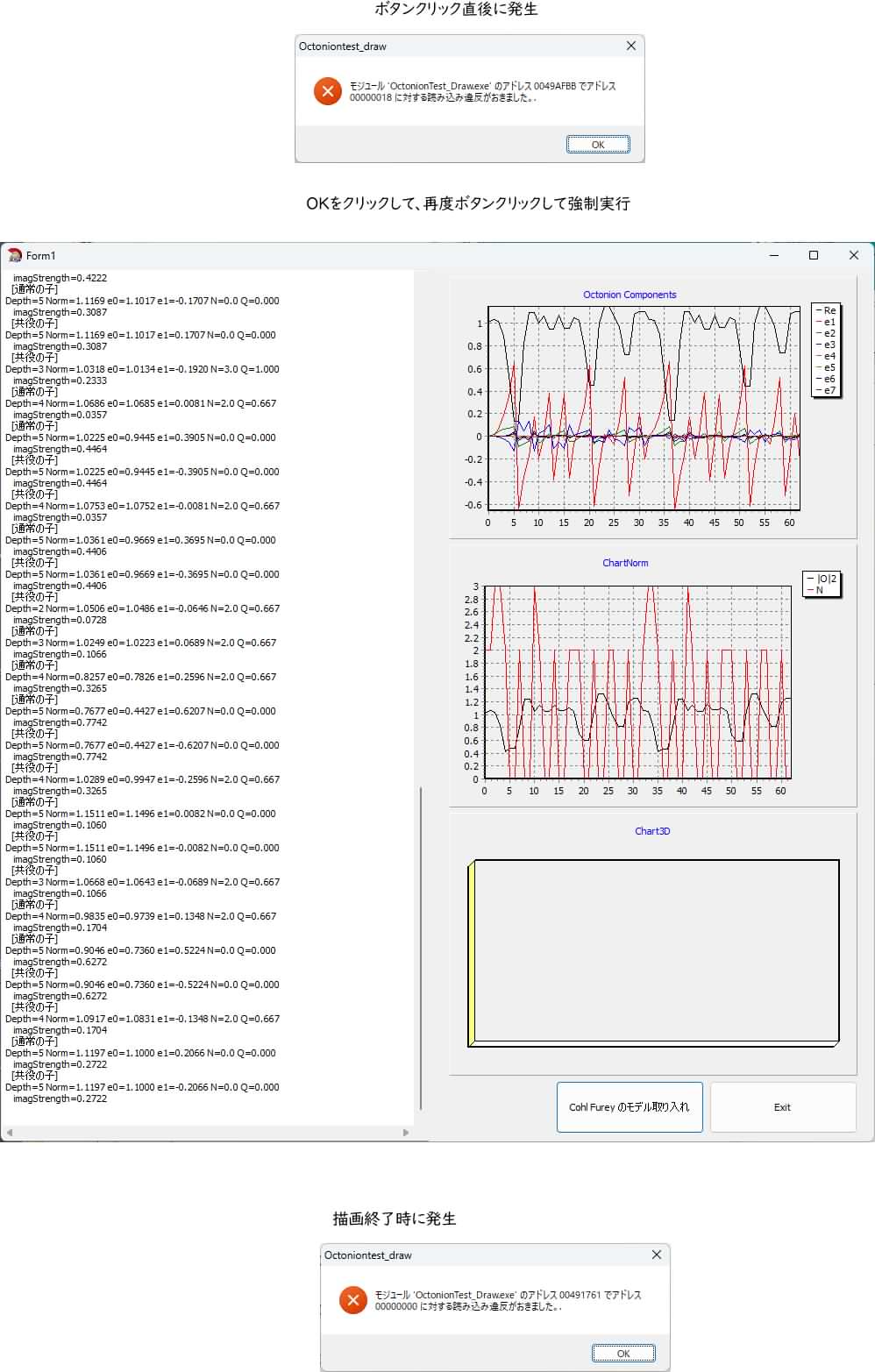
実行してみると、すぐにリンクエラーが発生しています
しかし、無理やりボタンクリックで、実行させると
チャート2種は描画できました
Chart3Dは描画できませんでした
描画後にまたリンクエラーがでました
C++Builder2007ソースコード
//**** Unit1.h ****
//—————————————————————————
#ifndef Unit1H
#define Unit1H
//—————————————————————————
#include <Classes.hpp>
#include <Controls.hpp>
#include <StdCtrls.hpp>
#include <Forms.hpp>
#include “Chart.hpp”
#include “TeEngine.hpp”
#include “TeeProcs.hpp”
#include <ExtCtrls.hpp>
//—————————————————————————
//————————————————
// 履歴用構造体
//————————————————
struct OctoState {
int step;
int depth;
double c[8];
double norm2;
double N;
int lastDeriv;
};
//————————————————
// 八元数
//————————————————
struct Octonion {
double e[8];
Octonion(double a0=0.0, double a1=0.0, double a2=0.0, double a3=0.0,
double a4=0.0, double a5=0.0, double a6=0.0, double a7=0.0);
Octonion operator+(const Octonion& o) const;
Octonion operator-(const Octonion& o) const; // 減算
Octonion operator-() const; // 単項マイナス(念のため)
Octonion operator*(const Octonion& o) const; // ← 変更:完全乗算
Octonion operator*(double scalar) const; // スカラー乗算は残す
double Norm() const;
Octonion Conjugate() const; // 標準的な共役
Octonion PhaseConjugate() const; // 位相共役用(必要に応じて拡張可能)
Octonion ApplyDerivation(const Octonion& a, const Octonion& b) const; // D_a,b (this)
};
//————————————————
// 再帰八元数
//————————————————
class RecursiveOcto {
public:
int depth;
Octonion value;
RecursiveOcto* child; // 通常の子
RecursiveOcto* childConj; // 共役の子(追加)
Octonion interference; // 干渉結果を保持するメンバーを追加
// ★ 追加
double N; // 数演算子(励起度)
double Q; // 電荷的な量 = N / 3
RecursiveOcto(int d, Octonion init);
~RecursiveOcto();
void Generate(int maxDepth);
void Dump(TMemo* memo);
void ComputeNumberOperator(); // ★ 追加
// 観察(Observe)機能との連携
int preferredDir; // 観察で固定された方向(-1 = 未観察)
void Observe(int dir); // dir = 0?6(e1?e7)
};
//————————————————
// フォーム
//————————————————
class TForm1 : public TForm
{
__published: // IDE-managed Components
TButton *ButtonExit;
TMemo *Memo1;
TButton *Button2;
TChart *ChartTime;
TChart *ChartNorm;
TChart *Chart3D;
void __fastcall ButtonExitClick(TObject *Sender);
void __fastcall Button2Click(TObject *Sender);
void __fastcall FormCreate(TObject *Sender);
private: // User declarations
TList* History;
void ClearHistory();
void CollectHistory(RecursiveOcto* node, int& counter);
void __fastcall InitTimeCharts();
void Init3DChart();
void __fastcall UpdateTimeCharts();
void __fastcall Update3DChart();
public: // User declarations
__fastcall TForm1(TComponent* Owner);
};
//—————————————————————————
extern PACKAGE TForm1 *Form1;
//—————————————————————————
#endif
//**** Unit1.cpp ****
//—————————————————————————
#include <vcl.h>
#pragma hdrstop
#include <math.h>
#include “Unit1.h”
//—————————————————————————
#pragma package(smart_init)
#pragma link “Chart”
#pragma link “TeEngine”
#pragma link “TeeProcs”
#pragma resource “*.dfm”
TForm1 *Form1;
//リンカ|出力オプション|最大スタックサイズ 0x64000000(約1.56GB)大きすぎであったので、0x10000000に設定
//—————————————————————————
__fastcall TForm1::TForm1(TComponent* Owner)
: TForm(Owner)
{
}
//—————————————————————————
void __fastcall TForm1::ButtonExitClick(TObject *Sender)
{
Close();
}
//—————————————————————————
//—————————————————————————
Octonion::Octonion(double a0, double a1, double a2, double a3,
double a4, double a5, double a6, double a7) {
e[0]=a0; e[1]=a1; e[2]=a2; e[3]=a3;
e[4]=a4; e[5]=a5; e[6]=a6; e[7]=a7;
}
Octonion Octonion::Conjugate() const {
return Octonion(
e[0],
-e[1], -e[2], -e[3], -e[4], -e[5], -e[6], -e[7]
);
}
Octonion Octonion::PhaseConjugate() const {
return Conjugate();
}
Octonion Octonion::operator+(const Octonion& o) const {
Octonion res;
for(int i=0; i<8; i++) res.e[i] = e[i] + o.e[i];
return res;
}
// 二項減算
Octonion Octonion::operator-(const Octonion& o) const {
Octonion res;
for(int i = 0; i < 8; i++) {
res.e[i] = e[i] – o.e[i];
}
return res;
}
// 単項マイナス
Octonion Octonion::operator-() const {
Octonion res;
for(int i = 0; i < 8; i++) {
res.e[i] = -e[i];
}
return res;
}
// スカラー乗算は残す
Octonion Octonion::operator*(double scalar) const {
Octonion res;
for(int i=0; i<8; i++) res.e[i] = e[i] * scalar;
return res;
}
// 完全な八元数乗算
Octonion Octonion::operator*(const Octonion& o) const {
Octonion res;
// e0(実部)
res.e[0] = e[0]*o.e[0] – e[1]*o.e[1] – e[2]*o.e[2] – e[3]*o.e[3]
– e[4]*o.e[4] – e[5]*o.e[5] – e[6]*o.e[6] – e[7]*o.e[7];
// e1
res.e[1] = e[0]*o.e[1] + e[1]*o.e[0] + e[2]*o.e[3] – e[3]*o.e[2]
+ e[4]*o.e[5] – e[5]*o.e[4] – e[6]*o.e[7] + e[7]*o.e[6];
// e2
res.e[2] = e[0]*o.e[2] – e[1]*o.e[3] + e[2]*o.e[0] + e[3]*o.e[1]
+ e[4]*o.e[6] + e[5]*o.e[7] – e[6]*o.e[4] – e[7]*o.e[5];
// e3
res.e[3] = e[0]*o.e[3] + e[1]*o.e[2] – e[2]*o.e[1] + e[3]*o.e[0]
+ e[4]*o.e[7] – e[5]*o.e[6] + e[6]*o.e[5] – e[7]*o.e[4];
// e4
res.e[4] = e[0]*o.e[4] – e[1]*o.e[5] – e[2]*o.e[6] – e[3]*o.e[7]
+ e[4]*o.e[0] + e[5]*o.e[1] + e[6]*o.e[2] + e[7]*o.e[3];
// e5
res.e[5] = e[0]*o.e[5] + e[1]*o.e[4] – e[2]*o.e[7] + e[3]*o.e[6]
– e[4]*o.e[1] + e[5]*o.e[0] – e[6]*o.e[3] + e[7]*o.e[2];
// e6
res.e[6] = e[0]*o.e[6] + e[1]*o.e[7] + e[2]*o.e[4] – e[3]*o.e[5]
– e[4]*o.e[2] + e[5]*o.e[3] + e[6]*o.e[0] – e[7]*o.e[1];
// e7
res.e[7] = e[0]*o.e[7] – e[1]*o.e[6] + e[2]*o.e[5] + e[3]*o.e[4]
– e[4]*o.e[3] – e[5]*o.e[2] + e[6]*o.e[1] + e[7]*o.e[0];
return res;
}
double Octonion::Norm() const {
double sum = 0.0;
for(int i=0; i<8; i++) sum += e[i]*e[i];
return sqrt(sum);
}
Octonion Octonion::ApplyDerivation(const Octonion& a, const Octonion& b) const
{
// 1. 交換子 [a,b]
Octonion ab = a * b – b * a; // [a,b]
// 2. 交換子の作用 [[a,b], this]
Octonion commutator_term = ab * (*this) – (*this) * ab;
// 3. 結合子 [a,b,this] = (a*b)*this – a*(b*this)
Octonion assoc = (a * b) * (*this) – a * (b * (*this));
// 4. 標準的な導分公式(係数は調整可能)
// D = [[a,b],x] – 3[a,b,x]
Octonion result = commutator_term – assoc * 3.0;
// スケール調整(摂動が大きすぎないように)
//return result * 0.5;
//return result * 0.20; // 摂動が少し強めに出ているようなので、スケールを少し弱めて0.5→0.20(60%減)安定性を確認する
//return result * 0.25; // 摂動が少し強めに出ているようなので、スケールを少し弱めて0.5→0.25(50%減)安定性を確認する
//return result * 0.30; // 摂動が少し強めに出ているようなので、スケールを少し弱めて0.5→0.30(40%減)安定性を確認する
return result * 0.35; // 摂動が少し強めに出ているようなので、スケールを少し弱めて0.5→0.35(30%減)安定性を確認する
//return result * 0.40; // 摂動が少し強めに出ているようなので、スケールを少し弱めて0.5→0.40(20%減)安定性を確認する
//return result * 0.45; // 摂動が少し強めに出ているようなので、スケールを少し弱めて0.5→0.45(10%減)安定性を確認する
//*** 評価結果:0.30:控えめだが効果は十分出る ***
//*** 評価結果:0.35:導分の影響がより明確に現れつつ、安定性も高い ***
}
//—————————————————————————
RecursiveOcto::RecursiveOcto(int d, Octonion v)
: depth(d), value(v), child(NULL), childConj(NULL),
N(0.0), Q(0.0), preferredDir(-1)
{
}
RecursiveOcto::~RecursiveOcto() {
delete child;
delete childConj;
}
void RecursiveOcto::Generate(int maxDepth) {
if (depth >= maxDepth) return;
/* // 通常の次ステップ
Octonion rotator(cos(depth * 0.15), sin(depth * 0.15), 0.05, 0, 0, 0, 0, 0);
Octonion next = value * rotator;
next = next + Octonion(0.03, 0, 0, 0, 0, 0, 0, 0);
// 共役版
Octonion nextConj = next.PhaseConjugate();
// 子を生成
child = new RecursiveOcto(depth + 1, next);
child->Generate(maxDepth);
childConj = new RecursiveOcto(depth + 1, nextConj);
childConj->Generate(maxDepth);
// ===== 干渉計算 =====
interference = (child->value + childConj->value) * 0.5;
// ===== 親へのフィードバック(ここが追加) =====
// 干渉結果を親のvalueに少し混ぜる(フィードバック強度は調整可能)
double feedbackStrength = 0.3; // 0.1?0.5くらいで試すと良い
value = value * (1.0 – feedbackStrength) + interference * feedbackStrength;
*/
/*
// === 既存の回転子 ===
Octonion rotator(cos(depth*0.15), sin(depth*0.15), 0.05, 0,0,0,0,0);
// === 新しい G2 的な微小導分を加える ===
// 例:e1 と e2 方向の導分を小さく作用させる
Octonion a(0, 1, 0, 0, 0, 0, 0, 0); // e1
Octonion b(0, 0, 1, 0, 0, 0, 0, 0); // e2
Octonion g2_perturb = value.ApplyDerivation(a, b) * 0.08; // 小さな摂動
Octonion next = (value + g2_perturb) * rotator;
next = next + Octonion(0.03, 0,0,0,0,0,0,0);
// 共役版
Octonion nextConj = next.PhaseConjugate();
// 子生成(既存と同じ)
child = new RecursiveOcto(depth+1, next);
child->Generate(maxDepth);
childConj = new RecursiveOcto(depth+1, nextConj);
childConj->Generate(maxDepth);
// 干渉 + フィードバック(既存)
interference = (child->value + childConj->value) * 0.5;
double feedbackStrength = 0.3;
value = value * (1.0 – feedbackStrength) + interference * feedbackStrength;
*/
/* // === 既存の回転子 ===
Octonion rotator(cos(depth*0.15), sin(depth*0.15), 0.05, 0,0,0,0,0);
// === Fano平面を意識した導分方向の切り替え ===
// depth % 7 で7種類の方向を巡回
int dir = depth % 7;
Octonion a, b; // 導分に使う2つの虚単位
switch(dir) {
case 0: // e1, e2 → e3 の線
a = Octonion(0,1,0,0,0,0,0,0); // e1
b = Octonion(0,0,1,0,0,0,0,0); // e2
break;
case 1: // e1, e4 → e5
a = Octonion(0,1,0,0,0,0,0,0); // e1
b = Octonion(0,0,0,0,1,0,0,0); // e4
break;
case 2: // e1, e6 → e7
a = Octonion(0,1,0,0,0,0,0,0); // e1
b = Octonion(0,0,0,0,0,0,1,0); // e6
break;
case 3: // e2, e4 → e6
a = Octonion(0,0,1,0,0,0,0,0); // e2
b = Octonion(0,0,0,0,1,0,0,0); // e4
break;
case 4: // e2, e5 → e7
a = Octonion(0,0,1,0,0,0,0,0); // e2
b = Octonion(0,0,0,0,0,1,0,0); // e5
break;
case 5: // e3, e4 → e7
a = Octonion(0,0,0,1,0,0,0,0); // e3
b = Octonion(0,0,0,0,1,0,0,0); // e4
break;
case 6: // e3, e5 → e6
a = Octonion(0,0,0,1,0,0,0,0); // e3
b = Octonion(0,0,0,0,0,1,0,0); // e5
break;
}
// 導分を作用させる(係数は前回の実験で良かった値を使用)
//*** 評価:現時点では 0.08 前後 が扱いやすく、バランスが良い印象です ***
//Octonion g2_perturb = value.ApplyDerivation(a, b) * 0.04;
//Octonion g2_perturb = value.ApplyDerivation(a, b) * 0.05;
//Octonion g2_perturb = value.ApplyDerivation(a, b) * 0.06;
Octonion g2_perturb = value.ApplyDerivation(a, b) * 0.08;
//Octonion g2_perturb = value.ApplyDerivation(a, b) * 0.10;
//Octonion g2_perturb = value.ApplyDerivation(a, b) * 0.12;
//Octonion g2_perturb = value.ApplyDerivation(a, b) * 0.16;
Octonion next = (value + g2_perturb) * rotator;
next = next + Octonion(0.03, 0,0,0,0,0,0,0);
// 共役版
Octonion nextConj = next.PhaseConjugate();
// 子生成
child = new RecursiveOcto(depth+1, next);
child->Generate(maxDepth);
childConj = new RecursiveOcto(depth+1, nextConj);
childConj->Generate(maxDepth);
// 干渉 + フィードバック
interference = (child->value + childConj->value) * 0.5;
double feedbackStrength = 0.3;
value = value * (1.0 – feedbackStrength) + interference * feedbackStrength;
*/
/* // === 既存の回転子 ===
Octonion rotator(cos(depth*0.15), sin(depth*0.15), 0.05, 0,0,0,0,0);
// === Fano平面の方向定義(配列化して扱いやすくする) ===
// 7種類の (a, b) ペアをあらかじめ定義
Octonion dirs[7][2] = {
{ Octonion(0,1,0,0,0,0,0,0), Octonion(0,0,1,0,0,0,0,0) }, // 0: e1,e2
{ Octonion(0,1,0,0,0,0,0,0), Octonion(0,0,0,0,1,0,0,0) }, // 1: e1,e4
{ Octonion(0,1,0,0,0,0,0,0), Octonion(0,0,0,0,0,0,1,0) }, // 2: e1,e6
{ Octonion(0,0,1,0,0,0,0,0), Octonion(0,0,0,0,1,0,0,0) }, // 3: e2,e4
{ Octonion(0,0,1,0,0,0,0,0), Octonion(0,0,0,0,0,1,0,0) }, // 4: e2,e5
{ Octonion(0,0,0,1,0,0,0,0), Octonion(0,0,0,0,1,0,0,0) }, // 5: e3,e4
{ Octonion(0,0,0,1,0,0,0,0), Octonion(0,0,0,0,0,1,0,0) } // 6: e3,e5
};
int dir = depth % 7;
// === 複数導分を重ねる ===
// 主方向(強め)
//Octonion g2_perturb = value.ApplyDerivation(dirs[dir][0], dirs[dir][1]) * 0.07*0.7;
Octonion g2_perturb = value.ApplyDerivation(dirs[dir][0], dirs[dir][1]) * 0.07;
//Octonion g2_perturb = value.ApplyDerivation(dirs[dir][0], dirs[dir][1]) * 0.07*1.3;
// 隣接方向1(弱め)
int dir2 = (dir + 1) % 7;
//g2_perturb = g2_perturb + value.ApplyDerivation(dirs[dir2][0], dirs[dir2][1]) * 0.03*0.7;
g2_perturb = g2_perturb + value.ApplyDerivation(dirs[dir2][0], dirs[dir2][1]) * 0.03;
//g2_perturb = g2_perturb + value.ApplyDerivation(dirs[dir2][0], dirs[dir2][1]) * 0.03*1.3;
// 隣接方向2(さらに弱め)※オプション
int dir3 = (dir + 3) % 7; // 少し離れた方向
//g2_perturb = g2_perturb + value.ApplyDerivation(dirs[dir3][0], dirs[dir3][1]) * 0.015*0.7;
g2_perturb = g2_perturb + value.ApplyDerivation(dirs[dir3][0], dirs[dir3][1]) * 0.015;
//g2_perturb = g2_perturb + value.ApplyDerivation(dirs[dir3][0], dirs[dir3][1]) * 0.015*1.3;
// 次の状態生成
Octonion next = (value + g2_perturb) * rotator;
next = next + Octonion(0.03, 0,0,0,0,0,0,0);
// 共役版
Octonion nextConj = next.PhaseConjugate();
// 子生成
child = new RecursiveOcto(depth+1, next);
child->Generate(maxDepth);
childConj = new RecursiveOcto(depth+1, nextConj);
childConj->Generate(maxDepth);
// 干渉 + フィードバック
interference = (child->value + childConj->value) * 0.5;
double feedbackStrength = 0.3;
value = value * (1.0 – feedbackStrength) + interference * feedbackStrength;
*/
// === 既存の回転子 ===
Octonion rotator(cos(depth*0.15), sin(depth*0.15), 0.05, 0,0,0,0,0);
// === Fano平面の方向定義 ===
Octonion dirs[7][2] = {
{ Octonion(0,1,0,0,0,0,0,0), Octonion(0,0,1,0,0,0,0,0) }, // 0
{ Octonion(0,1,0,0,0,0,0,0), Octonion(0,0,0,0,1,0,0,0) }, // 1
{ Octonion(0,1,0,0,0,0,0,0), Octonion(0,0,0,0,0,0,1,0) }, // 2
{ Octonion(0,0,1,0,0,0,0,0), Octonion(0,0,0,0,1,0,0,0) }, // 3
{ Octonion(0,0,1,0,0,0,0,0), Octonion(0,0,0,0,0,1,0,0) }, // 4
{ Octonion(0,0,0,1,0,0,0,0), Octonion(0,0,0,0,1,0,0,0) }, // 5
{ Octonion(0,0,0,1,0,0,0,0), Octonion(0,0,0,0,0,1,0,0) } // 6
};
int dir = depth % 7;
// === 簡易的な局所N推定(Generate時点で使えるように) ===
double imagStrength = 0.0;
for(int i=1; i<=7; i++) imagStrength += fabs(value.e[i]);
// 簡易N(量子化前)
double localN = 1.0 + imagStrength * 0.8; // ベース + 虚部の強さ
if (localN > 3.0) localN = 3.0;
// Nに応じたスケール係数(Nが大きいほど強くする)
// N=0 → 弱い, N=3 → 強い
double nFactor = 0.4 + (localN / 3.0) * 0.9; // 0.4 ? 1.3 程度の範囲
//*******************************************************************
// Generate 内の導分部分で、観察済みの場合は固定方向を避ける/弱める
if (preferredDir >= 0) {
// 観察済みなら、固定方向に関係する導分を弱める
// (簡易的に nFactor をさらに下げる)
nFactor *= 0.5;
}
//*******************************************************************
// === 複数導分(N依存スケールを掛ける) ===
Octonion g2_perturb = value.ApplyDerivation(dirs[dir][0], dirs[dir][1]) * (0.07 * nFactor);
int dir2 = (dir + 1) % 7;
g2_perturb = g2_perturb + value.ApplyDerivation(dirs[dir2][0], dirs[dir2][1]) * (0.03 * nFactor);
int dir3 = (dir + 3) % 7;
g2_perturb = g2_perturb + value.ApplyDerivation(dirs[dir3][0], dirs[dir3][1]) * (0.015 * nFactor);
// 次の状態
Octonion next = (value + g2_perturb) * rotator;
next = next + Octonion(0.03, 0,0,0,0,0,0,0);
// 共役版
Octonion nextConj = next.PhaseConjugate();
// 子生成 (2個:共役対を生成)
child = new RecursiveOcto(depth+1, next);
child->Generate(maxDepth);
childConj = new RecursiveOcto(depth+1, nextConj);
childConj->Generate(maxDepth);
// 干渉 + フィードバック
interference = (child->value + childConj->value) * 0.5;
double feedbackStrength = 0.3;
value = value * (1.0 – feedbackStrength) + interference * feedbackStrength;
}
// 数演算子を計算するメソッド(新規追加)
void RecursiveOcto::ComputeNumberOperator()
{
// 基本励起:自分自身の虚数成分の「強さ」
// (e1?e7 の絶対値の合計を適度にスケール)
double imagStrength = 0.0;
/*imagStrength += fabs(value.e1);
imagStrength += fabs(value.e2);
imagStrength += fabs(value.e3);
imagStrength += fabs(value.e4);
imagStrength += fabs(value.e5);
imagStrength += fabs(value.e6);
imagStrength += fabs(value.e7); */
// ★ ここを e[1] ~ e[7] に修正
imagStrength += fabs(value.e[1]);
imagStrength += fabs(value.e[2]);
imagStrength += fabs(value.e[3]);
imagStrength += fabs(value.e[4]);
imagStrength += fabs(value.e[5]);
imagStrength += fabs(value.e[6]);
imagStrength += fabs(value.e[7]);
// 子供の有無による励起
int childCount = 0;
if (child) childCount++;
if (childConj) childCount++;
// 再帰的に子供の N を加算(階層全体の励起を蓄積) // 子供の N を再帰的に集める
double childrenN = 0.0;
if (child) {
child->ComputeNumberOperator();
childrenN += child->N;
}
if (childConj) {
childConj->ComputeNumberOperator();
childrenN += childConj->N;
}
// 最終的な N の定義(調整しやすい形)
// 子供の数 × 1.0 + 虚数強度 × 係数 + 子供たちの N の一部
//N = childCount * 1.0 + imagStrength * 0.8 + childrenN * 0.3;
// ★ 係数を調整したバージョン
// 子供の寄与を強め、虚数強度の影響を抑えめにする
/*N = childCount * 1.5
+ imagStrength * 0.4
+ childrenN * 0.25;*/
// ★ ここを大きく変更
N = childCount * 1.0 // 子供の数の影響を弱める
+ imagStrength * 0.6
+ childrenN * 0.05; // 子孫からの蓄積をかなり弱くする
// さらに、ある程度整数に近づけるための丸め(任意)
// N = floor(N + 0.5); // 整数にしたい場合はこの行を有効にする
// ★ ここから量子化(離散化)
/*if (N < 0.7) N = 0.0;
else if (N < 1.7) N = 1.0;
else if (N < 2.7) N = 2.0;
else if (N < 3.7) N = 3.0;
else N = 3.0; // 上限を3に制限
*/
// ★ 閾値を緩めた量子化
/*if (N < 0.8) N = 0.0;
else if (N < 1.8) N = 1.0;
else if (N < 2.8) N = 2.0;
else N = 3.0;*/
// 量子化
if (N < 0.7) N = 0.0;
else if (N < 1.5) N = 1.0;
else if (N < 2.3) N = 2.0;
else N = 3.0;
// 電荷的な量
Q = N / 3.0;
}
void RecursiveOcto::Observe(int dir)
{
if (dir < 0 || dir > 6) return;
preferredDir = dir;
// 指定した虚単位の成分を強調し、他を相対的に抑制する簡易投影
// (完全な射影ではなく、観察による「固定」のイメージ)
double strength = value.e[dir + 1]; // e1?e7
// 指定方向を残しつつ、全体を少し正規化
for(int i = 1; i <= 7; i++) {
if (i == dir + 1) {
// 指定方向はそのまま(または少し強調)
value.e[i] = strength * 1.1;
} else {
// 他の方向を弱める
value.e[i] *= 0.6;
}
}
// 子にも同じ観察を伝播(再帰)
if (child) child->Observe(dir);
if (childConj) childConj->Observe(dir);
}
void RecursiveOcto::Dump(TMemo* memo)
{
/* if (!memo) return;
AnsiString s;
s.sprintf(“Depth=%d Norm=%.4f e0=%.4f e1=%.4f N=%.3f Q=%.3f”,
depth,
value.Norm(),
value.e[0],
value.e[1],
N,
Q);
memo->Lines->Add(s);
if (child) {
memo->Lines->Add(” [通常の子]”);
child->Dump(memo);
}
if (childConj) {
memo->Lines->Add(” [共役の子]”);
childConj->Dump(memo);
}
*/
if (!memo) return;
AnsiString s;
s.sprintf(“Depth=%d Norm=%.4f e0=%.4f e1=%.4f N=%.1f Q=%.3f”,
depth, value.Norm(), value.e[0], value.e[1], N, Q);
memo->Lines->Add(s);
// オプション:虚部の大きさを少し詳しく
double imag = 0;
for(int i=1;i<8;i++) imag += fabs(value.e[i]);
s.sprintf(” imagStrength=%.4f”, imag);
memo->Lines->Add(s);
if (child) { memo->Lines->Add(” [通常の子]”); child->Dump(memo); }
if (childConj) { memo->Lines->Add(” [共役の子]”); childConj->Dump(memo); }
}
//—————————————————————————
//—————————————————————————
void __fastcall TForm1::UpdateTimeCharts()
{
// 一旦クリア
for (int i = 0; i < ChartTime->SeriesCount(); i++)
ChartTime->Series[i]->Clear();
ChartNorm->Series[0]->Clear();
ChartNorm->Series[1]->Clear();
for (int i = 0; i < History->Count; i++) {
OctoState* s = (OctoState*)History->Items[i];
// 8成分
for (int k = 0; k < 8; k++)
ChartTime->Series[k]->AddXY(s->step, s->c[k]);
// ノルムとN
ChartNorm->Series[0]->AddXY(s->step, s->norm2);
ChartNorm->Series[1]->AddXY(s->step, s->N);
}
ChartTime->Refresh();
ChartNorm->Refresh();
}
void TForm1::ClearHistory()
{
for (int i = 0; i < History->Count; i++)
delete (OctoState*)History->Items[i];
History->Clear();
}
void __fastcall TForm1::Update3DChart()
{
TPointSeries* ser = (TPointSeries*)Chart3D->Series[0];
ser->Clear();
for (int i = 0; i < History->Count; i++) {
OctoState* s = (OctoState*)History->Items[i];
// とりあえず (e1, e2) をプロット(後で切り替え可能)
double x = s->c[1]; // e1
double y = s->c[2]; // e2
// N で色分け
TColor col;
if (s->N < 0.5) col = clBlack;
else if (s->N < 1.5) col = clBlue;
else if (s->N < 2.5) col = clGreen;
else col = clRed;
ser->AddXY(x, y, “”, col);
}
Chart3D->Refresh();
}
void TForm1::CollectHistory(RecursiveOcto* node, int& counter)
{
if (!node) return;
OctoState* s = new OctoState;
s->step = counter++;
s->depth = node->depth;
for (int i = 0; i < 8; i++) s->c[i] = node->value.e[i];
s->norm2 = node->value.Norm() * node->value.Norm();
s->N = node->N;
s->lastDeriv = node->depth % 7;
History->Add(s);
CollectHistory(node->child, counter);
CollectHistory(node->childConj, counter);
}
void __fastcall TForm1::Button2Click(TObject *Sender)
{
Memo1->Clear();
ClearHistory();
Octonion rootVal(1.0, 0, 0, 0, 0, 0, 0, 0);
RecursiveOcto* root = new RecursiveOcto(0, rootVal);
root->Generate(5); // 後で7?8に上げてください
root->Observe(2);
root->ComputeNumberOperator();
int counter = 0;
CollectHistory(root, counter);
root->Dump(Memo1);
UpdateTimeCharts();
Update3DChart();
delete root;
}
//—————————————————————————
void __fastcall TForm1::FormCreate(TObject *Sender)
{
History = new TList();
InitTimeCharts();
Init3DChart();
}
//—————————————————————————
void __fastcall TForm1::InitTimeCharts()
{
ChartTime->View3D = false;
ChartTime->Legend->Visible = true;
ChartTime->Title->Text->Text = “Octonion Components”;
// 8本の線シリーズを作成
for (int i = 0; i < 8; i++) {
TLineSeries* ser = new TLineSeries(ChartTime);
ChartTime->AddSeries(ser);
ser->Title = (i == 0) ? “Re” : “e” + IntToStr(i);
ser->LinePen->Width = 1;
// 色はお好みで(例)
static TColor cols[8] = {clBlack, clRed, clGreen, clBlue,
clFuchsia, clOlive, clNavy, clMaroon};
ser->SeriesColor = cols[i];
}
// ノルム用チャート
ChartNorm->View3D = false;
TLineSeries* sNorm = new TLineSeries(ChartNorm);
TLineSeries* sN = new TLineSeries(ChartNorm);
ChartNorm->AddSeries(sNorm);
ChartNorm->AddSeries(sN);
sNorm->Title = “|O|2”;
sN->Title = “N”;
sNorm->SeriesColor = clBlack;
sN->SeriesColor = clRed;
}
void TForm1::Init3DChart()
{
Chart3D->View3D = true;
Chart3D->View3DOptions->Orthogonal = false;
Chart3D->Legend->Visible = false;
TPointSeries* ser = new TPointSeries(Chart3D);
Chart3D->AddSeries(ser);
ser->Pointer->Style = psCircle;
ser->Pointer->HorizSize = 3;
ser->Pointer->VertSize = 3;
}